New User Information -- Getting Started
What is Deeproute?
Deeproute is a complete professional american football simulation that can be played with nothing more than a web browser. You both coach and GM your team with options dependant on the league you sign up for. Best off, you can play for absolutely free.What can I do in this game?
Choose a helmet for your team, and a City and Team Name. This is your team's identity. The longer you have a single consistent team identity, the better your home field advantage is. So picking an enjoyable team identity is important. Next up is taking a look at your Roster, and cutting anyone that you really really don't want. Perhaps then you'd look over Free Agency, and see if you can sign some better players, or ones that more match your style. Then you set your Depth Charts. Maybe take your team out for a spin with a scrimmage against other players. Then.. the waiting. Most leagues spin once a day, and your "League Calendar" will tell you when your league will spin, as well as what day in the season your league is on.Who should I contact if I find a bug?
Please contact Customer SupportIs this game affiliated with the NFL?
No, we are an independant professional football game.How do I sign up for a team?
After creating and verifying your account, the next step you will need to do is sign up for a team. After logging in, you will see a screen similar to the one below. The location of the link to sign up for a new team is circled in blue.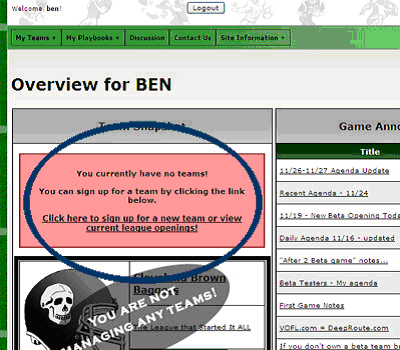
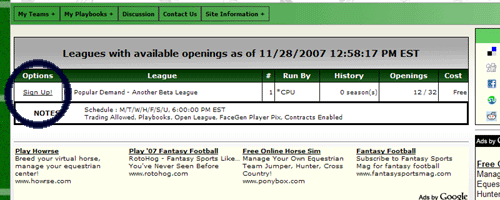
After clicking on the link to sign up for a team, you will be taken to a page that shows current league openings. Some of these leagues may be newly formed, with all new teams; others may have extended history with the majority of the teams already being owned by current players. If there are no openings, drop us a message through the "Contact Us" link at the top of the page and we'll make sure to open one up for public signups within 24-48 hours.
Each league has options attached to it. These options include the schedule the league will run, as well as other options (ie : FaceGen faces, trading availability, password protection, etc). The cost to play in a league is also listed. Some leagues are free, while others require an up front fee to sign up for. Some leagues may also require you to sign up for several seasons at a time before. If you are a new user, it is suggested you initially sign up for a free league. Free leagues cost nothing to participate in and are a great way to get your feet wet in the game, but are limited in options.
To sign up for a league, click on the "Sign Up" button.
You will be taken to a screen that shows you the current status of the league, as well as the teams in the league. Some leagues may already be in the process of playing a season; others will be at the beginning of the season. Please be aware of this when signing up.
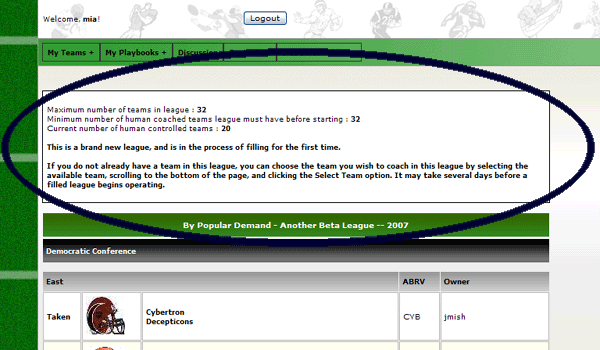
Teams available to be claimed will have a small circle beside them you can click on. If a league is an existing league with current openings, you can see information about teams in the league by clicking on the name of the team.
After selecting a team you would like to coach in the league, go to the bottom of the page and hit the "Select Team" button (if the league is private and requires a password, you will also be asked to enter it at this time).
After selecting your team, the screen will reload and you will be able to confirm that you are signed up for the team.
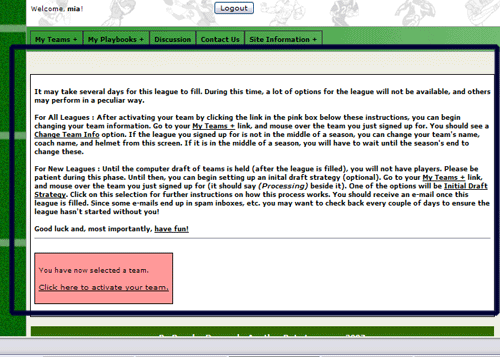
Before Confirming Your Team : Please thoroughly read all information provided to you by the game during this step!
After confirming your team, mouse over the My Teams option, and then mouse over the team you signed up for.
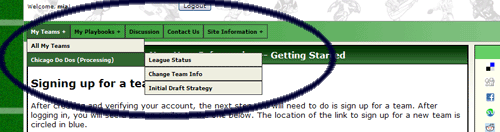
The options listed here can be used to keep track of the league status while it is processing, set your initial draft strategy, or change your team helmet / name / etc.
New leagues : There is not a team by team draft to populate your teams! This would be a logistical nightmare, and simply takes too long. You may, however, set your Initial Draft Strategy. Setting your initial draft strategy is not required to get a team, but can be used to help you get a team that is based more to your preferences. Click the "Initial Draft Strategy" option to do this. The instructions on how the initial draft strategy works are located on that page.
Personalizing Your Team :
All new and some existing leagues : Depending on where in the season the league you are entering in is at, you can change your team name, helmet, etc. Click on the "Change Team Info" option. Most options on this screen are straight forward (entering your team name, team abbreviation, etc).Changing Your Helmet :
For starters, simply click on the "Change / Load" button below your helmet.
If you want to use a helmet provided by the game : Scroll through the helmet screens using the Prev / Next buttons. The helmets are quite small, but clicking on them will select them and change the helmet on your "Change Team Info" screen to a larger version of the helmet. After you find a helmet you like, you can simply close the box by clicking the X in the upper right hand corner of this box.
If you would like to upload your own helmet : Click the Browse button. This will allow you to select a file from your hard drive. After selecting the file, hit the "Upload this Picture" button. Finally, click the "After Uploading : Click here to update your team helmet" button. This will change the helmet on your "Change Team Info" screen to your uploaded helmet.
When you are finished with all of your changes, be sure to hit the "Submit Changes" button.