Free Agents
Free Agents
Sometimes, you just need help. Whether used throughout the season to replace injured players or at the end of the season to sign star players, Free Agency is one way to improve your team quickly. This section will explain how Free Agency works in the game.For starters, it is important to know when free agency occurs. Free Agency signings are NOT immediate. When you make an offer for a free agent, you he will not immediately appear on your team. Free Agency occurs immediately before any other processing has taken place for a spin. This is to allow you the opportunity to replace injured players if necessary.
It is also important to realize HOW free agency works. For starters, let's look at the free agent page. This can be reached by going to your individual team page and selecting the position you wish to target. You will immediately notice a Salary Management Console. This is similar to the one on your Rosters page, but is more focused toward Free Agency :
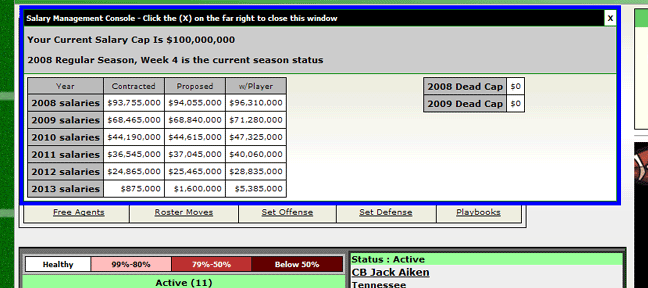
The 4 columns on your left are :
Year - obviously the season
Contracted - the amount of money you have promised to players currently on your roster plus any dead cap (shown on your far right)
Proposed - this is what your salary cap situation will look like if you were able to sign all free agents you have tendered contracts to this spin
w/Player - this column shows what your current salary cap situation would look like if you were to sign the player you have highlighted
The next figure shows individual data related to the free agents you can sign.
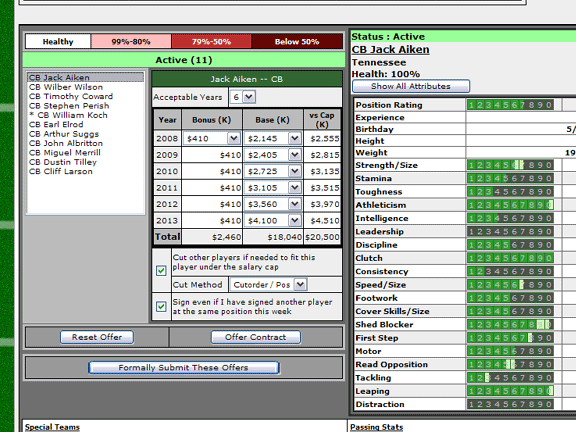
The first thing you will notice about the contract portion is the Acceptable Years field. The number of years available depends on each individual player. You can choose any of the years available.
If you change the years, you will notice that, often times, a player will request more bonus money to sign for less years. You will also notice that there are certain minimum values a player will accept for a yearly bonus and his base salaries.
The values shown are the minimum values a player would accept to play for your team. Currently, the salaries this player will accept will be the same for all teams. There are no negotiations needed to determine the minimum amounts a player will accept. If a contract is offered to this player, he will definitely sign a contract during the upcoming spin. If you are the only team to offer this player a contract, you will get the player.
If you already know the minimum a player would accept, why would you ever offer more money than the minimum? Ahhh.. what if contracts are offered by several different teams? In that instance, a player that is offered several contracts must decide between the contracts he is offered before accepting one. No "home town bonus", "winning team", etc. decisions is used; a player will accept the contract he considers the best.
To improve your chances of signing a player you can improve his base salaries or, more notably, his bonus salaries. Players prefer bonus money to base salary greatly, as the money is guaranteed; trying to trick a player with a backloaded contract with a lot of base salary but a small bonuse won't work nearly as well as offering him more bonuse (guaranteed) cash. Be careful about signing players for high bonuses, however; this amount is guaranteed to the player, and cutting or trading him in the future will require you to pay this amount and have it count against your dead cap (if your league uses the salary cap). See the Roster Limits / Salary Cap instructions for more information on how this works.
Before submitting the offer to the player, you may want to pay attention to the "check boxes" directly below the player :
Cut other players if needed to fit this player under the salary cap
This box is checked by default. This means that, if you can sign the player, you give the computer permission to cut players to get you under the salary cap or player limit if necessary. The drop down box only applies if the box is checked. If you choose "Cut Order / Pos", the computer will make it's cuts based on the cut order you set for players on your team (again, see the "Roster Limits / Salary Cap" instructions if you need more information on how the Cutorder field works). In case of a tie, it will cut based on the player that matches the same position as the free agent you signed. If you choose "Pos / Cut order", it will try to choose a player of the same position as the player you have signed. If there are several, it will order those players next by cut order.If this box is not checked and signing the player would put you over the salary cap or player limit, the computer will not sign the player.
Sign even if I have signed another player at the same position this week
This box is checked by default. If it is checked, the computer will allow you to sign the player even if you had already signed another player at the same position in the same spin.If the box is unchecked, the game will NOT sign a player if a player at the same position had already been signed during the same spin.
Once you reach a salary and terms you are comfortable offering the player, you can hit the "Offer Contract" button. The amount will then "lock in." You can remit the offer by hitting the "Reset Offer" button.
You will notice that an * appears next to players that have been offered contracts for the week.
You can make as many offers as you would like from this same screen. Makes sure, however, that you hit the "Formally Submit These Offers" button. Your contract submissions and modifications will not be accepted if you do not formally accept them!